RUtgers Mobile app
Role : UX Researcher, Interface designer.
Pandemic times were very challenging for everyone at the university, both physically and emotionally, as the in-person lectures were converted into online classes. After more than a year of remote learning, in-person learning resumed at the universities but students and faculty faced a lot of challenges and difficulties adjusting to the in-person learning style again. This project aims to use technology to help students utilize university resources more effectively and establish a healthy connection with others. To achieve this goal, we chose to redesign the existing Rutgers University mobile application for students by providing a more intuitive, personalized, and modern interface for easier access to campus resources.
Methodology
RESEARCH - User Research, walk in users shoes, understand the pain points.
EVALUATE & ITERATE
TESTING - Present to users, observe user behavior, collect feedback, suggestions.
THAT'S RIGHT : THE GOOD & BAD
DESIGN SKETCHING - Brainstorm the good & bad, blueprint of prototype
PROTOTYPING - Convert the design sketch to an interactive prototype for user test.

User Research
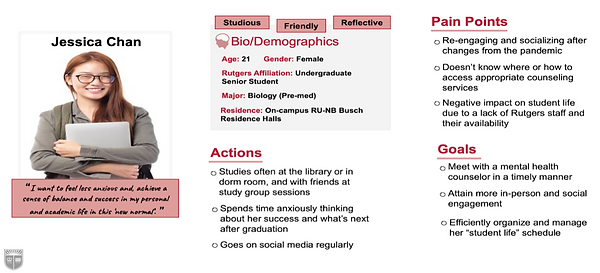
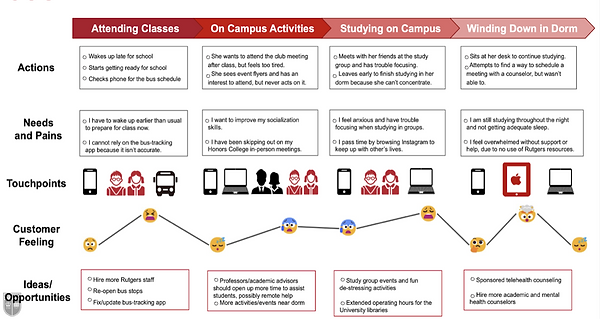
For user research, we used Qualtrics for creating a survey and sent it over to current Rutgers university students. We approached some students willing to attend an in-person interview with the US based on the survey response. Based on the survey and interview responses, we found that post covid 19, the majority of the students experience loneliness, isolation, anxiety, and trouble concentrating. To help get through this, most of the students took help from friends/family, increased outdoor activity time, etc., but only less than 20% of the students we conducted the survey tried to go for professional counseling help.
.png)
Persona and Journey Mapping
Design Sketching
.png)
Prototyping


Let’s
Connect
